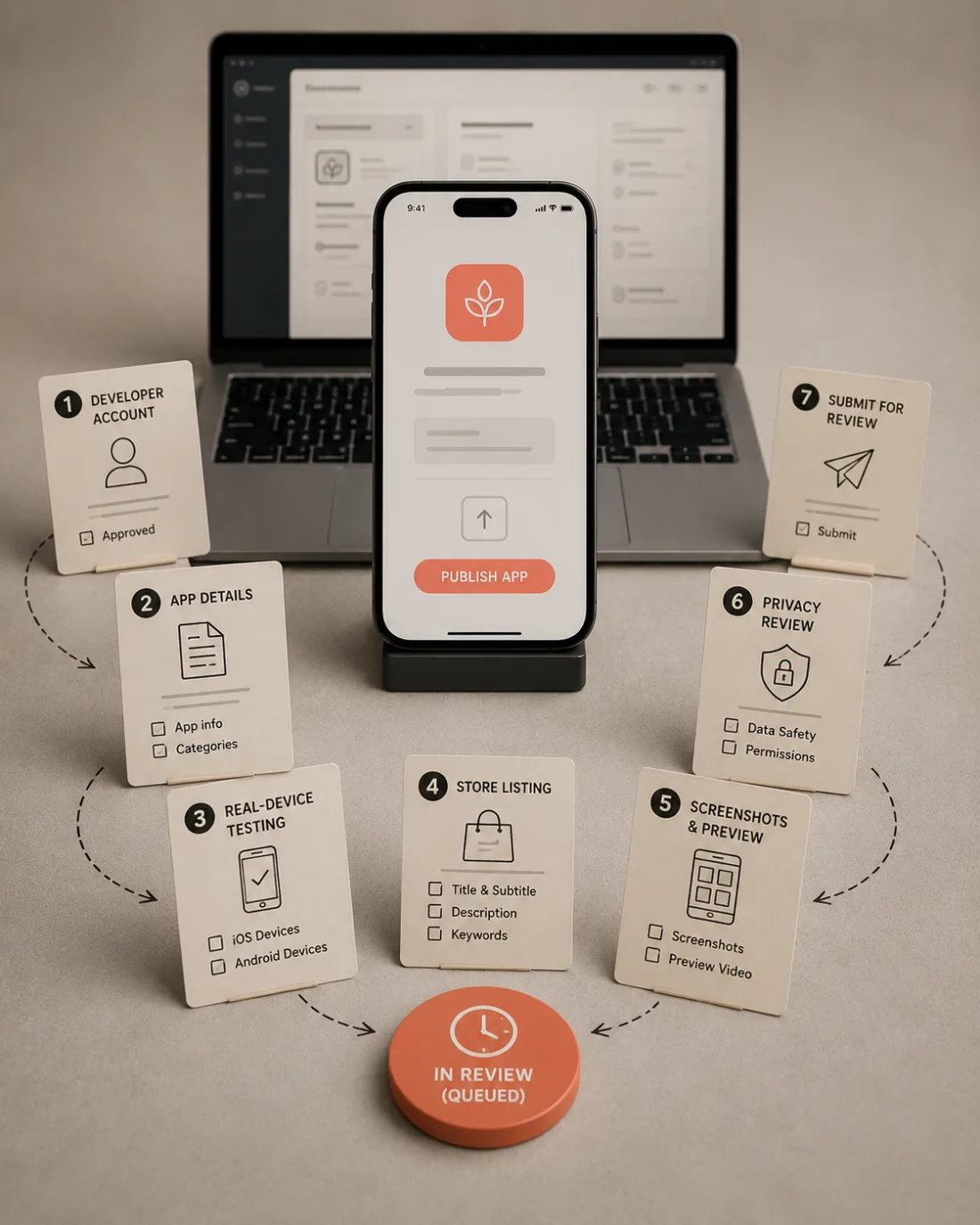
The thing people get wrong first
Ask most developers what stands between a working app and a published one and they will say hosting. Servers, deployment, infrastructure.
For a lot of modern apps, that is not the problem at all.
If your app runs entirely on the phone, there is no backend to stand up. Nothing to deploy. No server bill.
The hard part is not hosting. It is distribution. Getting the thing into a store, described correctly, with the right images, past a human reviewer who has never seen it before.
That distinction matters because people spend weeks learning deployment concepts they do not need, in much the same way they overbuild the app itself, while the actual obstacle sits untouched.
Phase 1: The account, which has a queue
Start here today, even if the app is half finished.
You need a paid Apple Developer Program membership. It costs 99 USD a year. And critically, approval is not instant. It can take a day, sometimes longer if they ask for verification.
Nothing else on this list can happen until it clears.
This is the step that catches everyone, because it is the one you cannot compress by working harder the night before launch. I have watched people finish an app on a Friday intending to ship that weekend, and discover they were three days from being allowed to.
One decision to get right while you are there: individual or organization. An organization needs a legal entity and a D-U-N-S number. Whichever you choose becomes the seller name buyers see, and changing it later is painful.
Phase 2: The app record, which nobody can do for you
Before you can upload anything, an app has to exist in App Store Connect as a record. A name, a bundle identifier, a primary language, a category.
This is worth calling out plainly: no tool can do this step for you. Apple's official API can manage versions, upload screenshots, and set all your metadata, but it cannot create the app itself. Any service claiming to fully automate publishing still needs you to do this by hand.
Two things here are permanent. The bundle identifier can never change. And app names are unique across the store, so the obvious one is probably taken.
Phase 3: The build
Mostly familiar territory, with three traps.
The app must run on a real device, not just the simulator. Your build number has to be higher than anything you uploaded before. And you will be asked about export compliance, which sounds alarming and usually just means confirming you use standard encryption like HTTPS.
The trap that catches people: it must not crash on a clean install. Your device has data, granted permissions, and a logged-in session. A reviewer's does not. Delete the app, reinstall fresh, deny every permission prompt, and see what happens.
Phase 4: The listing
Here is where developers discover they are now doing marketing.
You write an app name, a subtitle, a keyword field, a description, and promotional text. Each has a character limit. Each does a different job.
The part that surprises people: only three of those fields affect search. Your beautiful description is not one of them. It converts, it does not get you found.
And the description itself is mostly wasted effort past the first three lines, because everything after that sits behind a "more" tap that few people press.
Phase 5: Screenshots
Exact pixel dimensions, specific device sizes, and a rule that silently breaks uploads: no transparency or alpha channel. Easy to trigger by accident when exporting from a design tool.
The good news is you do not need a set per device. Apple scales down automatically, so making the largest size well is enough.
The part that actually matters is not technical. Most people swipe once, maybe twice. Your first two screenshots do nearly all the work, and a bare screenshot of your interface means nothing to someone who has never used your app. A short caption above each one does most of the explaining.
Phase 6: Privacy and review notes
Two things here cause more rejections than anything else.
The privacy questionnaire. You declare what data your app collects. The trap is that the SDKs you added collect data on your behalf, and you are responsible for declaring theirs too. Answer it after auditing your dependencies, not from memory.
The demo account. If your app has any login, a reviewer needs working credentials in the review notes. Not instructions for creating an account. A real one, tested that morning.
This single field is the most common avoidable rejection there is, and it takes five minutes.
Phase 7: Submit, and do not announce
Choose manual release so you control the day. Then wait.
Review is usually quick now, often a day or two, but it varies and you do not control it.
So the rule: never announce a launch date you have not been approved for. Get approved, then announce. That one habit removes most of the stress from shipping, and I have never met anyone who regretted it.
If it gets rejected
It probably will, at least once, and it is not a judgment on your app. It is a note saying one specific thing is wrong. Most are fixed in under an hour.
The five that catch first-timers, in order: no demo account, crashes on a clean launch, privacy answers that do not match what the app collects, placeholder content left on a reachable screen, and a support URL that does not load.
Four of those five are fixable in minutes. The cost is not the fix. It is the round trip.
What to do today
If your app works and you have not started any of this, do one thing this afternoon: begin the developer account enrollment.
It is the only step with a queue, it blocks everything else, and it costs you nothing to start early.
Everything after that is paperwork. Boring rather than difficult, which is a much better problem than the one you thought you had.